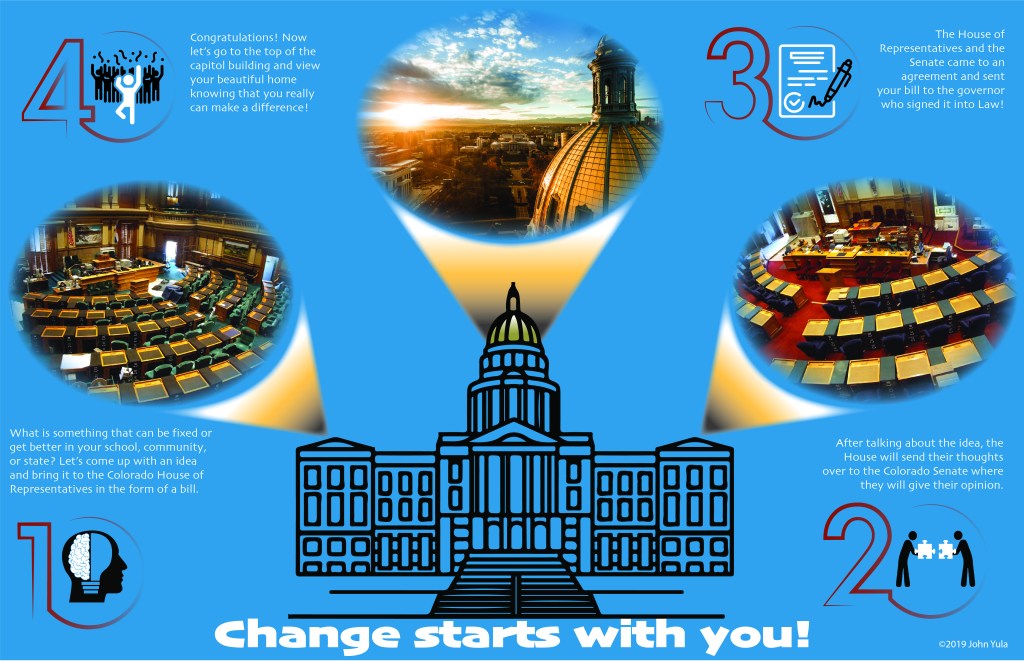
Previously for my class entitled Visual and Verbal Communication in Instructional Design I had to create an infographic. The prompt for this assignment was that a group of fourth graders had just discovered that they were unable to go on a field trip due to lack of funding. My infographic, and eventual eLearning module, were going to help serve as replacements for the field trip. When I developed my infographic, I did so with the eventual eLearning module in mind. I know that I wanted students to learn the process of a bill becoming a law. This made the translation from static images to an interactive eLearning module much easier. The information initially presented on the infographic was much more basic but was intended on piquing interest in the content despite their disappointment.
Throughout this course we have learned to incorporate various learning principles into our work to help ensure the best learning experience possible. A couple of foundational principles that I constantly tried to utilize were reducing cognitive load through following the stages of learning and chunking information (Driscoll, 2018). Their ability to interact with content enhances their ability to retain information as supported by the Substitution Augmentation Modification and Redefinition (SAMR) Theory (Puentedura, 2011). Once interactivity increases then higher level thinking does as well. Much of the content that is created does so through storytelling, which also helps to connect learners with the information making them feel more invested (Jantakoon, Wannapiroon, & Nilsook, 2019). It has also been much easier to create content knowing when to use conversational language as opposed to being more formal (Drew, 2016).
Up to this point in my Master’s program I have learned some valuable lessons and developed my skills. In order to complete my eLearning module I made sure to incorporate the concepts through various learning theories while trying not to try to do too much. Both Peters (2014) and Slade (2013) became constant references for me as I used their research and information to guide how I organized my content visually and practically. Many of the tutorials helped me grasp more design principles that, in actuality, better prepared me to translate content as intended. The most valuable of these was Trani’s (2018) tutorial on Adobe XD as this has become my favorite software to work with. It feels extremely natural and fluid and while I may have been able to figure out some of the techniques on my own, he helped expedite the process. Overall, I feel very comfortable with where I am at thus far in the program and look forward to whatever comes next.
Here are links to both my eLearning module and me walking through its usage.
https://xd.adobe.com/view/55cc2422-13ec-43ea-74da-f31458654cb3-23fd/?fullscreen
References
Drew, P. (2016, July 6). Copywriting for instructional design narration and role playing. Retrieved from https://e-learningvoices.com/copywriting-for-instructional-design-narration-and-role-playing/
Driscoll, M. (2018). Psychological foundations of instructional design. In R.A. Reiser, & J.V Dempsey (Eds.), Trends and issues in instructional design and technology (4th ed.) (pp. 52-60). New York, NY: Pearson
Jantakoon, T., Wannapiroon, P., & Nilsook, P. (2019). Synthesis of framework of Virtual Immersive Learning Environments (VILEs) based on digital storytelling to enhance deeper learning for undergraduate students. International Education Studies, 12(4), 198–207. doi: EJ1211500
Peters, D. (2014). Interface design for learning: Design strategies for learning experiences. San Francisco, CA: New Riders. Retrieved from https://ce.safaribooksonline.com/book/web-design-and-development/9780133365481/5dot-learning-is-visual/ch05_html
Puentedura, R. (2011, October 27). SAMR and change [Blog post]. Retrieved from http://hippasus.com/blog/archives/56
Slade, T. (2013, July 6). Writing styles for elearning narration. Retrieved from http://www.tim-slade.com/writing-styles-for-elearning-narration–jul.-6,-2013.html
Trani, P. (2018, February 15). Designing and prototyping a website with Adobe XD. Retrieved from https://www.lynda.com/Experience-Design-tutorials/Designing-Prototyping-Website-Adobe-XD/586674-2.html
 John Yula's Mastery Journal